

Hemory
Captures and generates content from daily experiences.
- Freemium· from $10/month
- Web


What is Hemory?
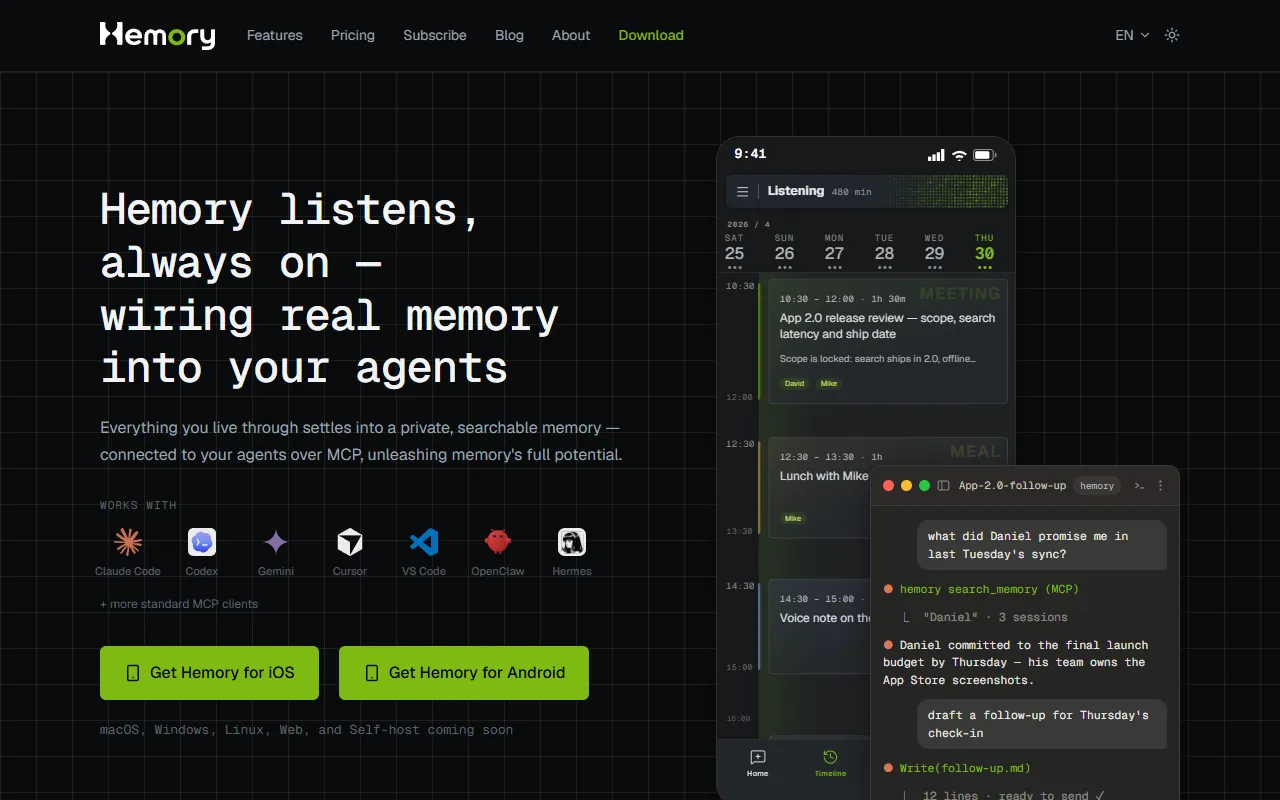
Hemory is a Speech to Text tool that captures and generates content from daily experiences. Hemory is freemium: it has a free plan, and paid plans start at $10/month. A free trial is available. It is available on Web App, iOS, Android and App Store (iOS). It is aimed at productivity users and note-takers.
Hemory uses always-on listening to capture daily experiences, converting them into generated content. It auto-transcribes and summarizes activities, distinguishing speakers by voice and offering a built-in Q&A agent. Designed for productivity and note-taking, it supports multiple platforms and schedules listening.
Built for productivity users and note-takers.
Key capabilities
Features
Auto-transcribed into Golden Documents
Activity Splitting
Splits daily activities into segments.
Activity Type Summaries
Provides summaries tailored to each activity type.
Speaker Identification
Built-in Q&A Agent
Scheduled Listening
Allows listening on a schedule.
Platform Support
Use cases
- Generate content from daily experiences
- Auto-transcribe audio into structured documents
- Split daily activities into segments
- Provide summaries for each activity type
- Identify speakers by voice in recordings
- Query content using a built-in Q&A agent
Popular use cases
Who it's for
Pros & cons
Pros
- Free plan available
- Paid plans from USD 10/month
Cons
No documented limitations yet.
Pricing
Freemium — paid plans start at $10/month. Free trial available.
| Plan | Price |
|---|---|
| Free Trial | Free |
| Starter | $10 / month |
| Pro | $20 / month |
| Max | $50 / month |
Integrations
Security & compliance
- Encryption
- Data deletion
As stated on Hemory's website — not independently verified by AiByts.
FAQ
What is Hemory?
Hemory is a Speech to Text tool that captures and generates content from daily experiences. Hemory uses always-on listening to capture daily experiences, converting them into generated content. It auto-transcribes and summarizes activities, distinguishing speakers by voice and offering a built-in Q&A agent. Designed for productivity and note-taking, it supports multiple platforms and schedules listening.
Is Hemory free?
Hemory has a free plan; advanced features require a paid plan.
How much does Hemory cost?
Hemory offers 4 plans: Free Trial (Free), Starter ($10 / month), Pro ($20 / month) and Max ($50 / month).
What platforms does Hemory support?
Hemory is available on Web App, iOS, Android and App Store (iOS).
Who should use Hemory?
Hemory is built for productivity users and note-takers. Common uses: generate content from daily experiences, auto-transcribe audio into structured documents, split daily activities into segments and provide summaries for each activity type.
What does Hemory integrate with?
Hemory integrates with Anthropic.
What are the best alternatives to Hemory?
Similar tools on AiByts include EKHOS AI, VoiceAppear, Parrot Speech-to-text API, AssemblyAI and BlabbyAI.
Hemory news & updates

過去の会話から約束や期限を見つける方法
記録された会話から口頭での約束を見つけ、誰が何をいつまでに行うと合意したかを確かめます。不確かな点は行動に移す前に明示しましょう。
Hemory Blog7 min read
AI 어시스턴트는 회의와 통화에서 어떤 맥락을 활용해야 할까요?
채팅 기록, 직접 작성한 메모, 기록된 회의를 비교해 AI 어시스턴트에 프로젝트 계획에 필요한 맥락을 제공하는 방법과 실제 대화가 중요한 경우를 알아봅니다.
Hemory Blog7 min read지난 대화를 직접 검색할까요, MCP 에이전트를 사용할까요?
대화 기록을 직접 찾는 방법과 MCP에 연결된 에이전트를 비교합니다. 단서가 얼마나 구체적인지, 관련 대화가 몇 개인지, 답변을 받은 뒤 어떤 작업을 할지에 따라 선택하세요.
Hemory Blog6 min read
기록된 회의를 실행 항목 목록으로 바꾸는 방법
반복 가능한 검토 절차를 통해 회의 기록에서 실행 항목 목록을 작성합니다. 저장된 대화 맥락으로 초안을 만들고, 불확실한 담당자와 날짜를 표시한 뒤 확인합니다.
Hemory Blog6 min readAIエージェントの下書きを会話の内容に基づかせる方法
接続済みのAIエージェントに、取得した会話をもとに下書きを作成させる方法を紹介します。根拠のある記述に出典を示し、推測や不足情報を分け、送信前に内容を確認しましょう。
Hemory Blog9 min read
Hemory 수동 모드로 아이디어 포착하기
Hemory 수동 모드로 휴대폰이나 Apple Watch에서 말로 아이디어를 포착하고, 타임스탬프가 표시된 대화 기록과 내장 질의응답으로 나중에 다시 찾아보세요.
Hemory Blog5 min read
AI 초안을 보내기 전에 확인할 위험 신호
AI가 작성한 고객 이메일과 업데이트에서 근거 없는 주장, 새로 만들어 낸 약속, 사실과 추론의 경계를 확인하세요. 보내기 전에 빠르게 출처를 대조하는 방법을 알아봅니다.
Hemory Blog6 min read
검색 기능으로 AI 회의 노트 도구 비교하기
AI 회의 노트 도구의 기록 기능, 텍스트 변환 품질, 여러 세션에 걸친 검색, 장기 접근성과 재사용성을 비교하세요. 이전 대화에서 찾는 작업으로 업무가 어떤 기능에 의존하는지 확인할 수 있습니다.
Hemory Blog8 min readAIを会話履歴につなぐべきなのはどんなとき?
AIに記録済みの会話履歴が必要な場合と、短いブリーフで十分な場合を見極める実践的な基準を紹介します。繰り返し行う業務、過去の決定、最新情報を踏まえて判断できます。
Hemory Blog7 min read회의록에서 담당자와 마감일이 빠지는 이유와 확인할 곳
회의 후속 조치에서 담당자나 마감일이 빠지는 이유를 기록 여부, 발언자 구분, 실행 항목 추출, 검토 과정별로 진단합니다. 도구를 바꾸기 전에 취약한 단계를 찾아보세요.
Hemory Blog5 min read과거 회의를 바탕으로 AI 에이전트가 수용 기준을 초안 작성하도록 하는 방법
지원되는 AI 에이전트로 Hemory에 저장된 회의 내용을 바탕으로 수용 기준 초안을 작성하고, 각 기준의 근거가 된 논의를 확인하며, 아직 결정되지 않은 제품 관련 사항을 표시하는 방법을 알아봅니다.
Hemory Blog6 min read지난 대화에서 약속과 기한 찾는 방법
기록된 대화에서 말로 한 약속을 찾고, 누가 무엇을 언제까지 하기로 했는지 확인하며, 행동에 옮기기 전에 불확실한 부분을 기록하는 방법을 알아봅니다.
Hemory Blog6 min read
過去の通話から意思決定の理由を見つける方法
記録された通話から意思決定の理由をたどる方法を紹介します。HemoryのQ&Aで関連する議論を探し、文字起こしの該当箇所を確認して、根拠と推測を区別しましょう。
Hemory Blog7 min readAI를 대화 기록에 언제 연결해야 할까요?
AI가 기록된 대화 내역을 언제 필요로 하고 짧은 브리핑으로 충분한지 판단하는 실용적인 기준을 소개합니다. 반복 업무, 과거 결정, 최신 업데이트를 고려해 맥락 연결 여부를 결정하세요.
Hemory Blog6 min read타임스탬프가 표시된 대화 기록이란? 타임스탬프, 메모, 요약
대화 기록의 타임스탬프가 무엇을 표시하는지, 한 줄이나 더 넓은 구간을 가리킬 수 있는 이유, 그리고 대화 기록이 녹음 파일·메모·요약과 어떻게 다른지 알아봅니다.
Hemory Blog5 min readタイムスタンプ付き文字起こしとは?タイムスタンプ、メモ、要約の違い
文字起こしのタイムスタンプが何を示すのか、単語・行・区間のどこに付くのかを解説します。録音、メモ、要約との違いや、タイムスタンプだけでは確認できないことも紹介します。
Hemory Blog5 min read過去の会話から意思決定の根拠を書く方法
過去の会話をもとに、接続されたAIエージェントで意思決定の根拠を下書きする方法を紹介します。依頼の内容と現在の状況を伝え、記録済みの文字起こしに照らして下書きを確認しましょう。
Hemory Blog8 min read録画した会議からアクションリストを作成する方法
繰り返し使える確認手順で、録画した会議から信頼できるアクションリストを作成します。記録された会話の文脈からタスク案を作り、不明点を残したうえで、担当者と日付を確認します。
Hemory Blog7 min read
Details are compiled from Hemory's website and public sources, last verified Oct 6, 2026. Features and pricing change — confirm on the official site before you buy.
Try Hemory
Freemium · from $10/month
Tags
- Golden Documents
- Q&A Agent
- Scheduled Listening
Comments
Sign in to join the discussion.