

InLinks
Automates internal linking and optimizes content for SEO.
What is InLinks?
InLinks is a SEO tool that automates internal linking and optimizes content for SEO. InLinks is freemium: it has a free plan plus paid upgrades. It is aimed at seo professionals and content creators.
Automates internal linking and optimizes content for SEO. Provides entity-based page and site graph optimization, comprehensive content briefs, and audit capabilities. Designed for SEO professionals and content creators.
Built for seo professionals and content creators.
Key capabilities
Features
Topic Planner
Plans topics in context.
Entity-Based Page & Site Graph Optimization
Audit and Optimize Internal Linking
Comprehensive Content Optimization
Use cases
- Optimize content for SEO
- Automate internal linking processes
- Audit and improve internal linking at scale
Popular use cases
Who it's for
Pros & cons
Pros
- Public API available
- Free plan available
- Automates internal linking
Cons
No documented limitations yet.
Pricing
Freemium.
Developer & API
Public API available
- Authentication
- API Key
Security & compliance
- Data deletion
As stated on InLinks's website — not independently verified by AiByts.
FAQ
What is InLinks?
InLinks is a SEO tool that automates internal linking and optimizes content for SEO. Automates internal linking and optimizes content for SEO. Provides entity-based page and site graph optimization, comprehensive content briefs, and audit capabilities. Designed for SEO professionals and content creators.
Is InLinks free?
InLinks has a free plan; advanced features require a paid plan.
How much does InLinks cost?
InLinks is freemium: it has a free plan plus paid upgrades.
Does InLinks have an API?
Yes, InLinks offers a public API for building custom integrations.
Who should use InLinks?
InLinks is built for seo professionals and content creators. Common uses: optimize content for SEO, automate internal linking processes and audit and improve internal linking at scale.
What are the best alternatives to InLinks?
Similar tools on AiByts include GetGenie, Super, Distribb, Koala AI and Writesonic.
InLinks news & updates
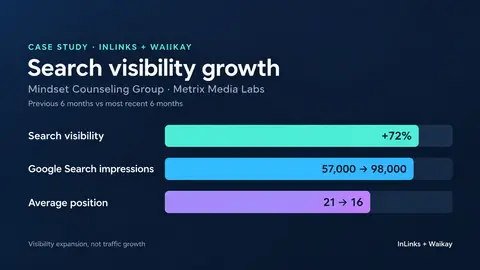
Case Study: How Metrix Media Labs used InLinks and Waikay to increase search visibility by 72%
News from InLinks.net How Metrix Media Labs combined InLinks’ semantic SEO capabilities with Waikay’s AI visibility analysis to strengthen the digital presence of Mindset Counseling Group; increasing Google Search impressions from approximately 57,000 to 98,000 while improving average position from…
InLinks Blog7 min read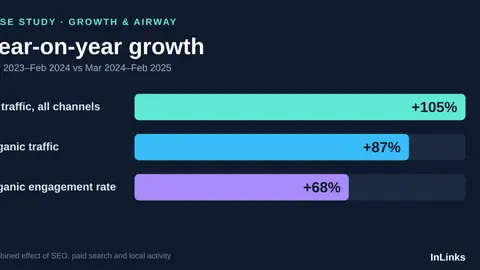
Case Study: How InLinks helped Growth & Airway grow organic traffic by 87% year-on-year
News from InLinks.net This case study highlights how Grant Whiteside, founder of Kyoom, used InLinks to rebuild a dental practice around what patients and clinicians actually search for.
InLinks Blog11 min read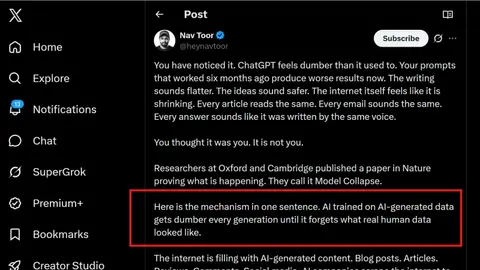
Model Collapse: Why the Web Needs Publishers to Say What They Mean
News from InLinks.net AI Is Slowly Forgetting Your Industry. Here Is the Research, and What Publishers Should Do About It. There is a peer-reviewed reason to believe that the AI systems mediating how your business gets found are degrading, and that the cause is the content we are all publishing.
InLinks Blog5 min readEntityMap: Helping AI understand what your website is about
News from InLinks.net For years, websites have relied on sitemaps to help search engines discover their pages. A sitemap tells Google and other crawlers where your URLs are. It is useful, important, and still part of the technical SEO foundation. But AI search is creating a new challenge.
InLinks Blog5 min read
Top 10 AI Brand Visibility Tools in 2026
News from InLinks.net Disclosure: Waikay is a product of InLinks, the publisher of this guide. It is included here on its own merits, but you should be aware of that relationship when weighing the coverage. AI is reshaping how brands are discovered.
InLinks Blog11 min read
How InLinks helps build Topical Presence on LLMs
News from InLinks.net Ask ChatGPT to recommend the best tool in your category. If your brand does not appear, the problem is probably not your rankings. It is that the AI never learned your brand belongs in that conversation. This is the uncomfortable reality for a lot of SEO teams right now.
InLinks Blog12 min read
Top 5 AI Text Humanizer Tools in 2026
News from InLinks.net As AI-generated content becomes the norm across marketing, education, and publishing, one challenge keeps coming up: how do you make AI text sound genuinely human?
InLinks Blog3 min read
How to Use InLinks to Improve AI Visibility
News from InLinks.net The post How to Use InLinks to Improve AI Visibility appeared first on InLinks.
InLinks Blog3 min readHow to use Inlinks on WordPress
News from InLinks.net Connecting InLinks to your WordPress site can be done in two simple ways. The first method is by adding your InLinks project’s JavaScript code directly into your theme. This involves copying the JS code from your InLinks dashboard and pasting it into the site’s footer file.
InLinks Blog1 min read
SEO entities for local business (part 2): Integrate entities into local marketing strategies
News from InLinks.net In the first part of this article we looked at what an entity is, how it’s a vital element in your local digital identity and how to use InLinks tools to place them at the heart of your local SEO strategies.Now let’s take a look at how to put them to good use and relate […]…
InLinks Blog26 min read
Details are compiled from InLinks's website and public sources, last verified Oct 3, 2026. Features and pricing change — confirm on the official site before you buy.
Try InLinks
Freemium
Tags
- Entity SEO
- Content Optimization
- Internal Linking
Comments
Sign in to join the discussion.