

Premation
Free open-source motion editor and design studio for macOS and Windows
What is Premation?
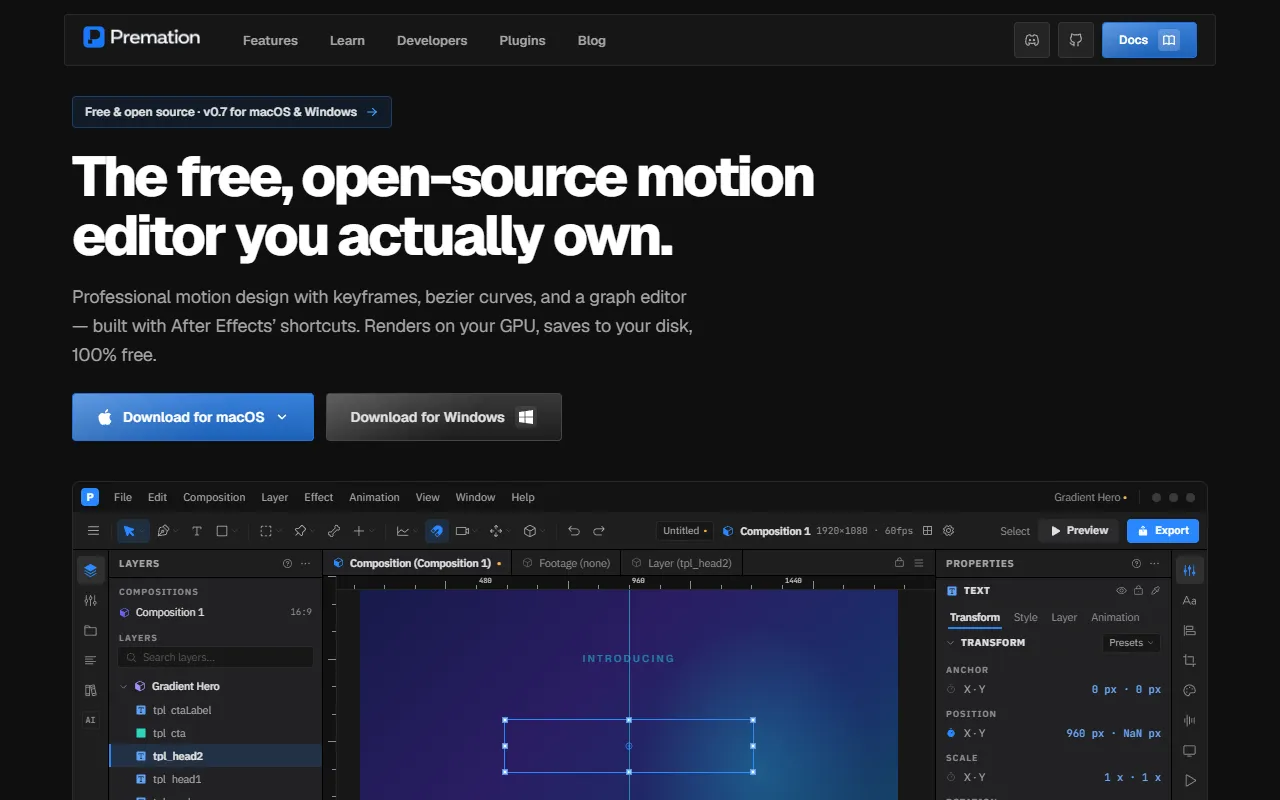
Premation is a Video Editing tool. Free open-source motion editor and design studio for macOS and Windows. Premation is free to use. It is available on Windows and macOS. It is aimed at motion designers, video editors and graphic designers.
Premation is a free, open-source desktop motion editor and motion design studio. It offers a high-performance alternative to Adobe After Effects with features like a bezier graph editor, 2.5D camera staging, character puppet rigging, vector animation, and GPU acceleration.
Built for motion designers, video editors and graphic designers.
Key capabilities
Features
Keyframe Animation
Enables precise control over animation timing and movement
Character Puppet Rigging
Facilitates complex character animation with inverse kinematics
Vector Shape Operators
Provides tools for creating and manipulating vector shapes
Deterministic Multi-Format Export
ProRes 4444 with Alpha
WebM Export
Lottie Export
GPU Accelerated Engine
Utilizes GPU for faster rendering and performance
After Effects Keyboard Shortcuts
Provides workflow parity with Adobe After Effects
Local-First Workflow
Supports offline editing with native .motion files
Compositions and Layers
Use cases
- Create 2.5D space compositing with 3D cameras and lighting
- Design character puppet rigging with inverse kinematics
- Export animations in ProRes 4444 with alpha channel
- Use GPU accelerated engine for faster rendering
- Utilize After Effects keyboard shortcuts for workflow parity
- Organize animation elements with compositions and layers
Who it's for
- Motion Designers
- Video Editors
- Graphic Designers
Pros & cons
Pros
- Free plan available
- Public API available
- Supports GPU acceleration for performance
Cons
No documented limitations yet.
Pricing
Free.
Developer & API
Public REST API available
- Authentication
- API Key, Bearer Token
- Webhooks
- Supported
Open source· AGPL-3.0· 52 stars· 10 forks
FAQ
What is Premation?
Premation is a Video Editing tool. Free open-source motion editor and design studio for macOS and Windows. Premation is a free, open-source desktop motion editor and motion design studio. It offers a high-performance alternative to Adobe After Effects with features like a bezier graph editor, 2.5D camera staging, character puppet rigging, vector animation, and GPU acceleration.
Is Premation free?
Yes, Premation is free to use.
How much does Premation cost?
Premation is free to use.
Does Premation have an API?
Yes, Premation offers a public REST API with webhooks for building custom integrations.
What platforms does Premation support?
Premation is available on Windows and macOS.
Who should use Premation?
Premation is built for motion designers, video editors and graphic designers. Common uses: create 2.5D space compositing with 3D cameras and lighting, design character puppet rigging with inverse kinematics, export animations in ProRes 4444 with alpha channel and use GPU accelerated engine for faster rendering.
Is Premation open source?
Yes, Premation is open source under the AGPL-3.0 license.
What are the best alternatives to Premation?
Similar tools on AiByts include Stanley Studio, Snapr, AutoEdit, Gling and Supra Player.
Premation news & updates
Why We’re Building an AI-Native Motion Editor
The tools are incredibly powerful, but the workflow hasn’t changed much in decades.
Premation Blog4 min read
Details are compiled from Premation's website and public sources, last verified Oct 5, 2026. Features and pricing change — confirm on the official site before you buy.
Try Premation
Free
Tags
- After Effects Alternative
- Free Motion Editor
- Motion Design Software
Comments
Sign in to join the discussion.