

SlimSnap
Turns screenshots into JSON for CLI agents
What is SlimSnap?
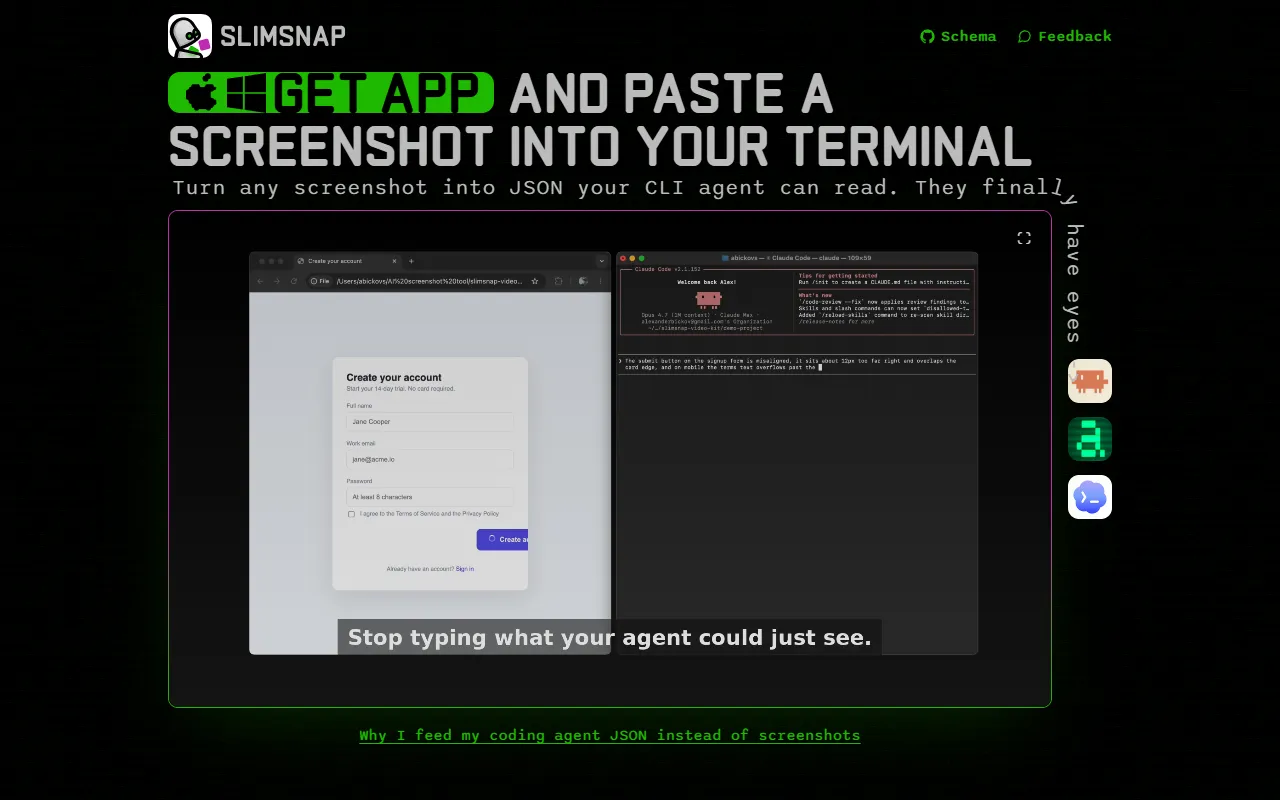
SlimSnap is a Code Generation tool that turns screenshots into JSON for CLI agents. It is available on Windows, macOS and Linux. It is aimed at developers and cli users.
SlimSnap converts screenshots into JSON format that CLI agents can process. It is designed for developers using tools like Claude Code and Aider. The tool is free for Mac and Windows during launch.
Built for developers and cli users.
Features
Capture
Annotate
Copy JSON
Vision for Tools
Enables tools without image capabilities to process screenshots
Use cases
- Convert screenshots into JSON for CLI agents
- Enable terminal agents to interpret screenshots
- Capture and process visual data in development workflows
Who it's for
- Developers
- CLI Users
Pros & cons
Pros
- Free for Mac and Windows during launch
- No registration required
Cons
No documented limitations yet.
Integrations
Developer & API
Open source· MIT· 11 stars· 0 forks
FAQ
What is SlimSnap?
SlimSnap is a Code Generation tool that turns screenshots into JSON for CLI agents. SlimSnap converts screenshots into JSON format that CLI agents can process. It is designed for developers using tools like Claude Code and Aider. The tool is free for Mac and Windows during launch.
What platforms does SlimSnap support?
SlimSnap is available on Windows, macOS and Linux.
Who should use SlimSnap?
SlimSnap is built for developers and cli users. Common uses: convert screenshots into JSON for CLI agents, enable terminal agents to interpret screenshots and capture and process visual data in development workflows.
What does SlimSnap integrate with?
SlimSnap integrates with Anthropic.
Is SlimSnap open source?
Yes, SlimSnap is open source under the MIT license.
What are the best alternatives to SlimSnap?
Similar tools on AiByts include GitHub Copilot, CodeHealth MCP Server by CodeScene, Amazon Q Developer CLI, Blackbox AI and CodeSpotlight.
SlimSnap news & updates
Gemini image upload limit: how many images and how big (2026)
10 files per prompt, 100 MB per image, and a rolling limit Google does not put a number on. The Gemini image limits.
SlimSnap Blog4 min readHow to take a terminal screenshot, and when to copy the text instead
Screenshot the terminal window, or take a screenshot from the command line. And why long output belongs in a text file.
SlimSnap Blog4 min readChatGPT image upload limit: how many images and how big (2026)
20 MB per image, 80 uploads per 3 hours, 3 a day on Free. The ChatGPT image limits, and how to stay under them.
SlimSnap Blog4 min readPrint Screen not working on Windows 11? How to fix PrtSc
PrtSc opens Snipping Tool or does nothing? The setting to change, the apps that steal the key, and where the capture went.
SlimSnap Blog4 min readScreenshot not working on Mac? How to fix Shift+Command+4
Shift+Command+4 does nothing? Six fixes, from the Keyboard Shortcuts setting to apps that block capture.
SlimSnap Blog3 min readVisual regression testing tools compared (2026)
Playwright, BackstopJS, Chromatic, Percy and Applitools by price and free plan, and where pixel diffs fall short.
SlimSnap Blog4 min readWhy a full page screenshot repeats the top of the page
Past 16,384 pixels, Chrome repeats the top of the page and reports success. Why, and how to capture the rest.
SlimSnap Blog3 min readHow to screenshot on an HP, Dell or Samsung laptop
PrtSc, Fn+PrtSc or Fn+Insert. How to screenshot on HP, Dell and Samsung laptops, and one shortcut that works on all of them.
SlimSnap Blog3 min readCan Cursor see my screen?
Not your screen. Four ways Cursor can see what you see, and which one fits.
SlimSnap Blog3 min readBest screenshot extensions for Chrome in 2026
GoFullPage, FireShot, Awesome Screenshot and Lightshot compared, and the capture that cannot be pulled from the Web Store.
SlimSnap Blog5 min readSnipping Tool for Mac: the shortcuts and apps that replace it
No Snipping Tool on Mac. Every Snipping Tool feature mapped to its Mac shortcut, and the three gaps.
SlimSnap Blog3 min readCan Claude Code see my screen?
Not by default. Four ways to let Claude Code see what you see, and which one fits.
SlimSnap Blog4 min readHow to hide personal info in a screenshot before sending it to an AI
Names, emails, card numbers and passwords ride along in screenshots sent to AI. Capture only what it needs and cover the rest properly.
SlimSnap Blog4 min readBest screenshot API in 2026, from Playwright to Cloudflare
Playwright, Puppeteer, Cloudflare, Browserless and Urlbox compared by price. And the screens none of them can capture.
SlimSnap Blog5 min readHow to save a web page as an image
Save Page As saves HTML, not a picture. How to save a web page as an image in any browser.
SlimSnap Blog4 min readHow to let Claude Code verify its own UI changes
Claude stops when the UI looks done. Give it a target with text and positions to compare against, not just two screenshots.
SlimSnap Blog4 min readHow to take a full page screenshot in Firefox
Save full page in Firefox, why it gets cut off on Gmail and other web apps, and a scrolling capture that gets the rest.
SlimSnap Blog3 min readHow to screenshot a long email in Gmail or Outlook
Screenshot keys catch one screenful of a long email. Capture the whole thread, or save it as a PDF.
SlimSnap Blog3 min read
Details are compiled from SlimSnap's website and public sources, last verified Oct 5, 2026. Features and pricing change — confirm on the official site before you buy.
Try SlimSnap
Visit the official website
Comments
Sign in to join the discussion.